Detection → Firewall holds the honeypot’s ports (see Honeypot ports). This page explains what the honeypot catches and how a scan becomes a ban.
¶ What This Protects You Against
Almost every business connected to the internet has a public IP address. Automated scanners probe that address all the time. Within hours of any new IPv4 address going online, it starts receiving:
- SSH brute-force attempts. Tens to hundreds of TCP 22 probes per day, trying common username/password combinations or scanning for unpatched OpenSSH versions.
- Remote Desktop credential stuffing. TCP 3389 scans against leaked-credentials lists from prior data breaches. If your RDP server is internet-facing, it’s already on someone’s target list.
- Windows file-sharing exploitation. TCP 445 (SMB) probes looking for systems vulnerable to ransomware vectors like EternalBlue, WannaCry, and a long list of newer variants. SMB on the public internet is a near-guaranteed compromise path.
- Database scans. TCP 1433 (Microsoft SQL Server) and 3306 (MySQL) probes look for misconfigured database servers with default credentials or known CVEs.
- MikroTik router attacks. TCP 8291 (Winbox) probes target MikroTik gear specifically: credential stuffing and CVE exploitation. Particularly relevant if you use MikroTik in your network.
- Mass internet scanners. Tools like Masscan, ZMap, and the Shodan crawler hit every IPv4 address every day to map the internet. Their probes are how newly-disclosed vulnerabilities get weaponized within hours.
The Defend-O-Tron’s honeypot watches for these probes as traffic passes through the bridge, blocks the offender’s IP, and reports the address to the CrowdSec community. Your firewall sees less brute-force noise. The community gets one more report to build its blocklist from. You see fewer alerts that need investigating.
¶ How the Honeypot Works
The honeypot is a set of nftables rules on the Defend-O-Tron’s ingress interface (the side connected to your ISP). It watches for inbound connection attempts on ports your network shouldn’t be receiving traffic on. None of these ports are open on the Defend-O-Tron. They are ports the honeypot watches for inbound attempts to your network.
Because the Defend-O-Tron sits between your ISP and your firewall, the honeypot can see attempts that would otherwise hit your router directly. Catching them at the bridge means your firewall sees less of the noise, your logs stay cleaner, and the offending addresses are reported to CrowdSec. When enough reports about an address agree, CrowdSec adds it to the community blocklist that every other CrowdSec-equipped device uses.
The honeypot watches the same ports on IPv4 and IPv6.
¶ What Ports the Honeypot Watches
The default port list is curated for accuracy and performance. Most bad actors probe these common ports first. If they get nothing, they either move on or get caught further upstream by the deep-packet IDS layer (Suricata + CrowdSec). Adding too many ports increases log noise without increasing real-world protection.
¶ TCP
| Port(s) | Service | What it catches |
|---|---|---|
| 20-21 | FTP | Probes for misconfigured anonymous-FTP servers |
| 22 | SSH | The most-scanned port on the internet: brute-force and CVE scans |
| 23 | Telnet | IoT botnet recruitment (Mirai-family malware loves Telnet) |
| 25 | SMTP | Open-relay scanners and spam-abuse hunters |
| 445 | SMB | Windows file-sharing exploitation, ransomware reconnaissance |
| 1433-1434 | MSSQL | Microsoft SQL Server credential stuffing and CVE exploitation |
| 3128 | HTTP Proxy | Open-proxy hunters |
| 3306 | MySQL | Database brute-force and CVE exploitation |
| 3389 | RDP | Remote Desktop credential stuffing |
| 5985-5986 | WinRM | Windows Remote Management credential stuffing |
| 8291 | MikroTik Winbox | MikroTik router CVE exploitation |
¶ UDP
| Port(s) | Service | What it catches |
|---|---|---|
| 69 | TFTP | IoT and embedded-device firmware-pulling exploits |
| 135-139 | NetBIOS | Legacy Windows networking probes |
| 161 | SNMP | Network-device enumeration |
Any port you forward through your firewall must be removed from this list. The honeypot cannot tell a customer from a scanner. It only knows that nothing behind the bridge should be answering on these ports. If you port-forward (DNAT) one of them, the first packet from every legitimate user produces honeypot evidence, and that user is banned from every service on your network, not just the one they connected to. Check this list against your firewall’s forwarding rules before deployment, and again each time you add a forward.
ICMP is deliberately not in the honeypot list. Including it would interfere with Path MTU Discovery (PMTUD) and IPv6 neighbour discovery, which the internet quietly depends on.
¶ The Trusted List
Addresses on the trusted list are never banned, by the honeypot or by anything else. A trusted address is accepted before any of the block, ban or honeypot checks run, so it is never examined and never produces evidence against itself. That is also the trade: a listed address, or a whole listed range, is exempt from enforcement. Add what you genuinely trust and no more.
The device ships with public DNS resolvers on the list: Cloudflare (1.1.1.1), Google (8.8.8.8, 8.8.4.4) and Quad9 (9.9.9.9), with their IPv6 addresses, plus the private range 192.168.0.0/16 and IPv6 link-local fe80::/10. This stops a misbehaving public DNS service from triggering a ban that would break name resolution for everyone behind the Defend-O-Tron.
Change the list under Trusted addresses on Detection → Firewall. See Trusted addresses for how a save works, and how public trusted addresses are also copied to CrowdSec’s allowlist.
¶ What Happens When an Actor Is Caught
- The connection attempt is logged by the device’s nftables logger (ulogd2 group 2). See Log Ingress for the wider log architecture.
- CrowdSec reads the log and matches it against the honeypot bruteforce scenario.
- The offender’s IP is banned:
- An IPv4 address is banned for 12 hours the first time, 24 hours the second time, and 12 hours longer each time after that.
- An IPv6 address is banned together with its whole
/64network, for 4 hours each time.
- Both ingress and egress to that IP are blocked, so a user inside your network can’t accidentally contact the bad actor either.
- The address is reported to the CrowdSec community. When enough reports agree, CrowdSec adds it to the community blocklist, and other Defend-O-Trons (and CrowdSec-equipped devices worldwide) block it too.
Persistent IPv4 attackers get a longer ban each time they come back, so they stay blocked for as long as they keep trying. A persistent IPv6 attacker is banned again each time it returns.
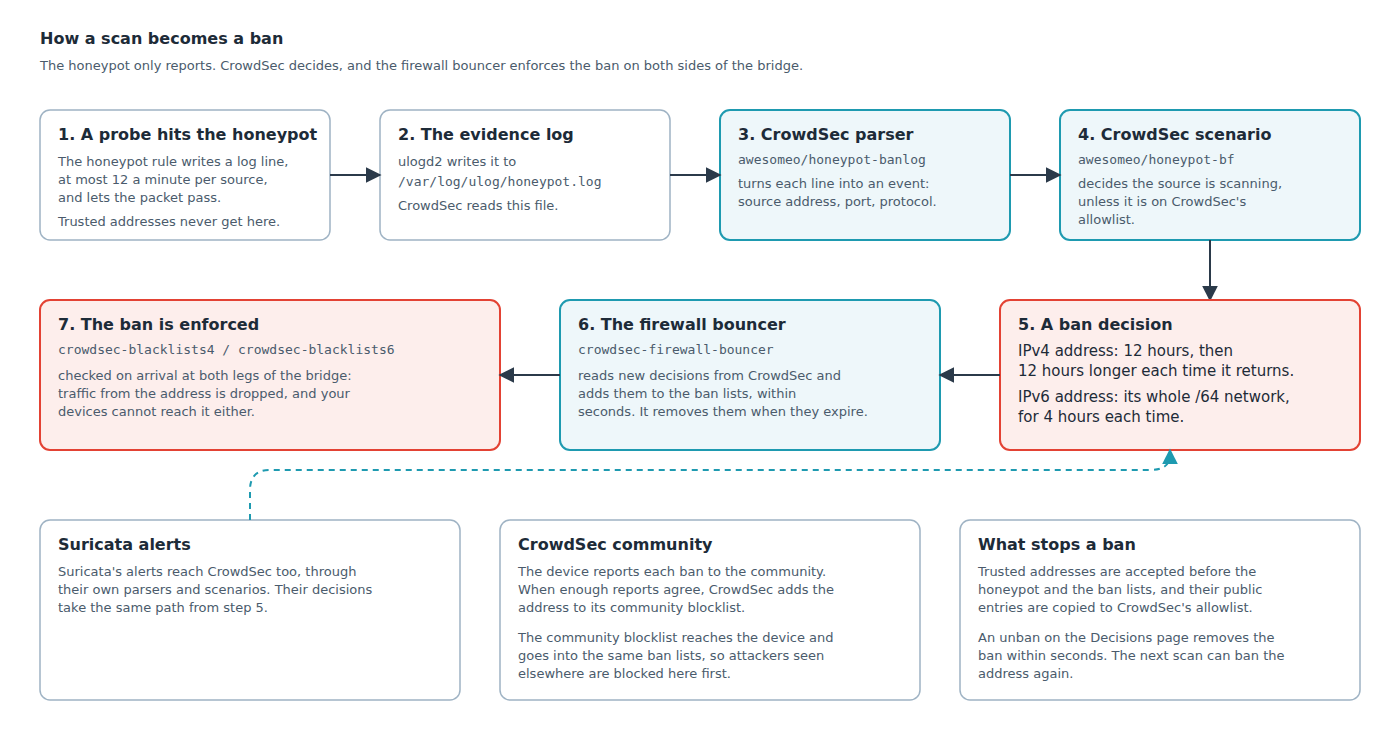
For the details behind each step, see Honeypot Internals.
¶ Common Situations
¶ You have a public-facing SSH jump host
If the jump host is reachable from the internet on TCP 22, remove port 22 from the honeypot list first. Otherwise your own users are banned on their first connection, in exactly the same way a scanner is. The honeypot sees a connection attempt to a port that should be unused and cannot tell the difference.
The better arrangement is to move the jump host to a non-standard port, or put it behind a VPN. Either leaves TCP 22 genuinely unused, so the honeypot keeps blocking the bulk of SSH scanners at the bridge before they reach your firewall, and your access path isn’t affected at all. Hardening the jump host (key-only authentication, fail2ban) is worth doing either way, but it does not change what the honeypot does with port 22.
¶ You have an internet-exposed mail server
If you run SMTP on standard TCP 25, remove port 25 from the honeypot port list before deployment. See Honeypot Internals for the file you edit. Legitimate inbound mail will otherwise be blocked. Better still: front your mail server with SMTPS (TCP 465) or submission (TCP 587), neither of which is in the honeypot list.
¶ You have Windows file shares
Internal Windows file sharing isn’t affected. The honeypot only watches inbound from the internet, not local traffic. But if any SMB traffic from the public internet shows up at TCP 445, it’s almost certainly ransomware reconnaissance and gets blocked immediately.
¶ You use Remote Desktop for IT or remote work
Put RDP behind a VPN or a dedicated remote-access gateway. That leaves TCP 3389 unused, which is what lets the honeypot block the constant credential-stuffing traffic aimed at it.
If you do forward TCP 3389, remove it from the honeypot list first. Otherwise your own remote workers are banned the moment they connect.
¶ You use MikroTik routers
TCP 8291 (Winbox) probes are a near-constant background on most public IPs. The honeypot catches them and shares the addresses with the community. This pairs especially well with the CrowdSec API MikroTik bouncer, which then enforces the same blocks at the router itself.
¶ You run an IoT or industrial network
TFTP (UDP 69), NetBIOS (UDP 135-139), and SNMP (UDP 161) probes are common against IoT and industrial deployments. The honeypot catches the reconnaissance phase before it turns into compromise.
¶ Your ISP’s gateway probes your addresses
Some upstream equipment polls the addresses it routes to. NetBIOS (UDP 137) and SNMP (UDP 161) are the usual ones, and both are honeypot ports. So the honeypot reports the ISP’s own gateway, CrowdSec bans it, and traffic on the link can be disrupted.
It’s easy to recognise: the banned address is your ISP’s gateway, or sits inside your own assigned IP block; it appears steadily rather than in bursts; and it always targets your own hosts. Add it to the trusted list. That is precisely what the list is for. Removing the port from the honeypot would also stop the bans, but you’d lose that detection against everyone else.
¶ You’re behind a CDN or behind double-NAT
Most attack noise is filtered upstream before it reaches you, so honeypot activity will be quieter. But anything that does come through is high-signal, so the honeypot is still worth having even when the volume is low.
¶ Handling False Positives
Real traffic occasionally trips honeypot rules. A scanner from your ISP’s network monitoring, a customer behind shared NAT, or a misconfigured legitimate service can all be banned by mistake. Check the situations above first: most false positives come from a forwarded port that is still on the honeypot list, or from the ISP’s own gateway.
For an address that should never be banned, add it to the trusted list (see The Trusted List above). To end a ban now, unban it on Threat activity → Decisions, in the CrowdSec Console, or with cscli. All four ways are described step by step in Handling false positives on the Decisions page.
¶ Customizing the Honeypot
Adjusting the port list, editing the CrowdSec parser, or modifying the bruteforce scenario is advanced work that can break your protection if done incorrectly. See the dedicated Honeypot Internals page for ACL file structure, NFT rule reference, CrowdSec parser/scenario YAML, and GROK pattern background.
¶ Related Pages
- Honeypot Internals: advanced customization, NFT rules, CrowdSec parser/scenario, packet flow diagrams.
- Log Ingress: how the honeypot’s log output is consumed by CrowdSec.
- CrowdSec API: attach external bouncers so they enforce the same decisions the honeypot produces.
- Threat activity dashboard: live view of what the honeypot (and the rest of the defense stack) is catching.