Advanced: back up before editing. This page covers low-level customization of the honeypot. Wrong rules can disable your firewall or break the detection pipeline. Always back up the files you change, and check the result with
sudo nft list ruleset.
For what the honeypot does and how to handle false positives, see Honeypot. Most changes can be made there, on the Firewall page, without editing any file.
¶ Packet Flow Reference
The honeypot, the trusted and blocked lists and the CrowdSec bans are all rules in the Linux kernel’s firewall, nftables (part of the Netfilter project). On the Defend-O-Tron they run on each leg of the bridge as packets arrive (the nftables ingress hook), before anything else on the device sees them. The bridge itself only counts the traffic that gets through.
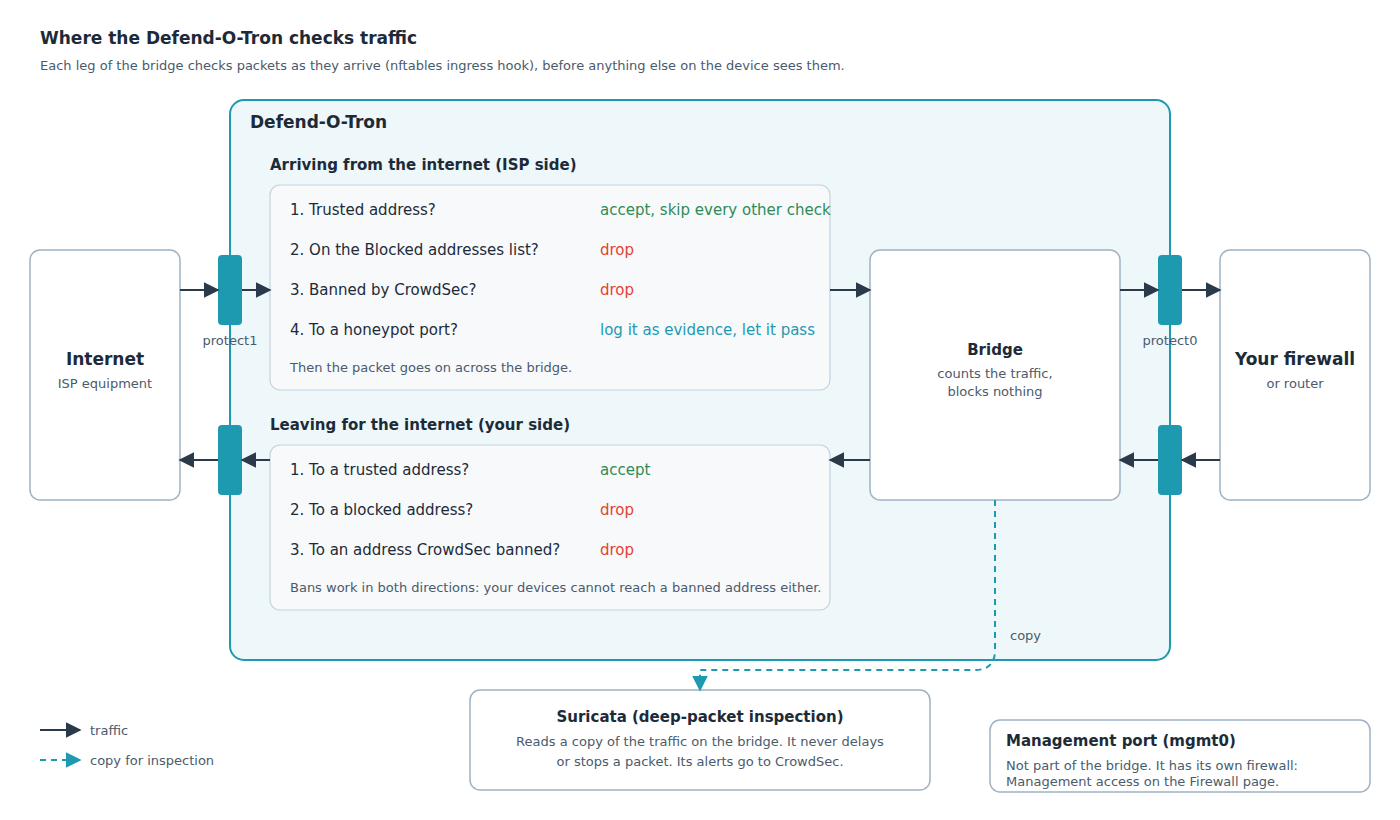
Suricata, the deep-packet inspection engine, works differently. It reads a copy of the traffic on the bridge (an AF_PACKET capture in IDS mode), so it does not slow traffic down, and traffic keeps flowing even if Suricata stops.
¶ How a scan becomes a ban
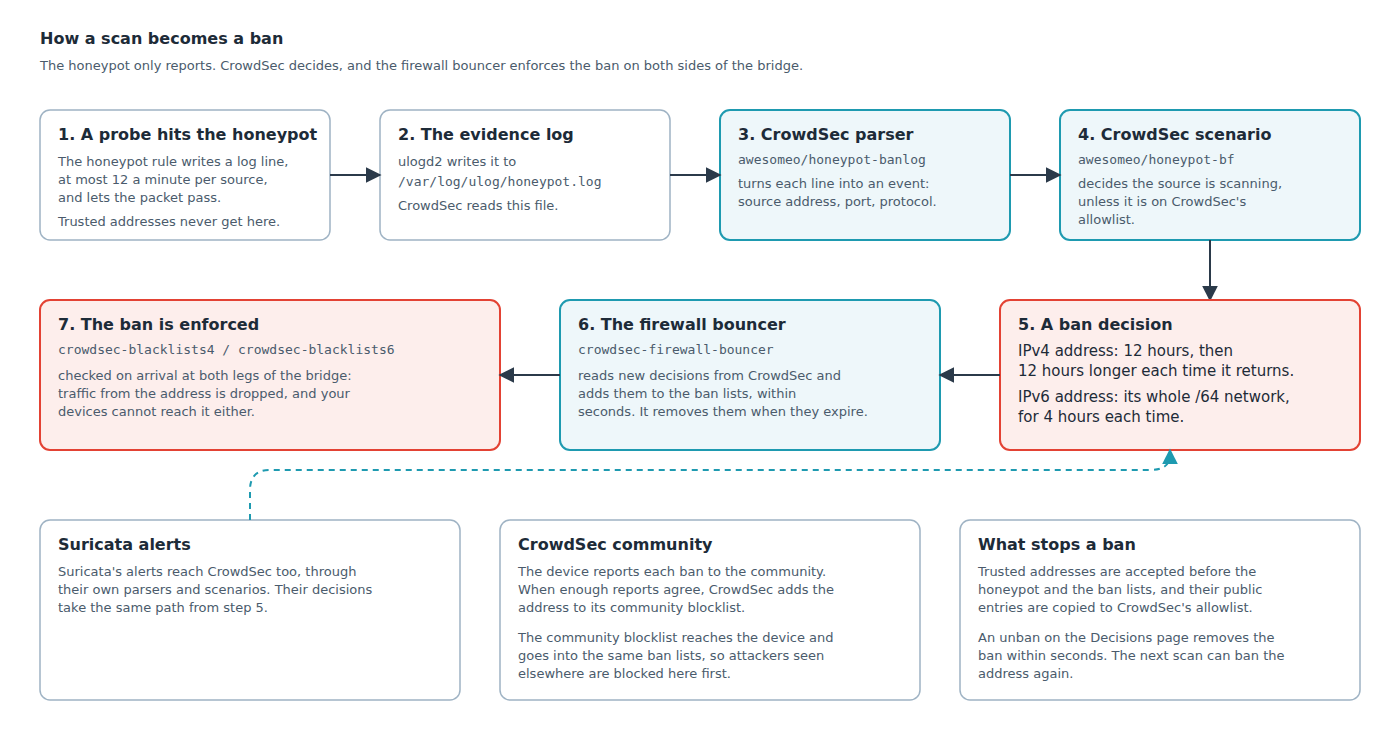
The honeypot rule blocks nothing itself. It writes evidence, CrowdSec decides on a ban, and the firewall bouncer puts the ban into the lists that the first check on each leg uses.
For how Netfilter’s hooks fit together in general, see Nftables: packet flow and Netfilter hooks in detail on thermalcircle.de.
You can read more about honeypots on Wikipedia.
¶ Editing the ACL Files
Change these lists on the Firewall page, not in the files. Edit the files directly only if you know the nftables syntax and how its rules and named sets work.
The Firewall page protects you in ways a text editor does not:
- It checks every value (address, prefix, port, range or service name) before saving.
- It test-loads the whole firewall with your change, on a private copy, before it touches the real file.
- It refuses a save if the file changed since you opened the page, so two people cannot overwrite each other.
- It records each change, and who made it, in the audit log.
A mistake in a hand-edited file, such as a missing comma or brace, or a value of the wrong kind, breaks the whole firewall configuration, not just that list. A reload then fails and the old rules keep running, but at the next restart the firewall cannot load at all. Until the file is fixed, the device enforces none of its trusted, blocked or banned lists, and the honeypot does not report. After every hand edit, test the files with
sudo nft -c -f /etc/nftables.conf, which checks them without applying anything, and fix every error before you reload or restart.
Three files hold the lists the honeypot uses. You can change any of them. The honeypot’s own rules should not need to change.
/etc/nftables.d/honeypot-acl.nft: the TCP and UDP ports the honeypot watches. Nothing else./etc/nftables.d/goodactors-acl.nft: the one trusted list. Addresses here are accepted outright on both sides of the bridge. They bypass the blocked list and live CrowdSec bans, and they never reach the honeypot rules, so a trusted host cannot produce the evidence that would get it banned./etc/nftables.d/badactors-acl.nft: IPv4 and IPv6 addresses that are always blocked, in both directions.
The Firewall page is the preferred way to change these lists. On Detection → Firewall, the Trusted addresses, Blocked addresses and Honeypot ports cards write the same files. Each save checks the change first, then updates only the affected lists while the firewall keeps running: no reboot, and the live CrowdSec bans stay in place.
¶ After editing a file by hand
A hand edit does not change the running firewall. To load it, use Reload firewall on the Firewall page. It loads every rule again from /etc/nftables.conf, restarts the CrowdSec bouncer so the live bans come back, and checks that the bouncer is running. The honeypot’s rate limits start over, and the traffic counters reset to zero.
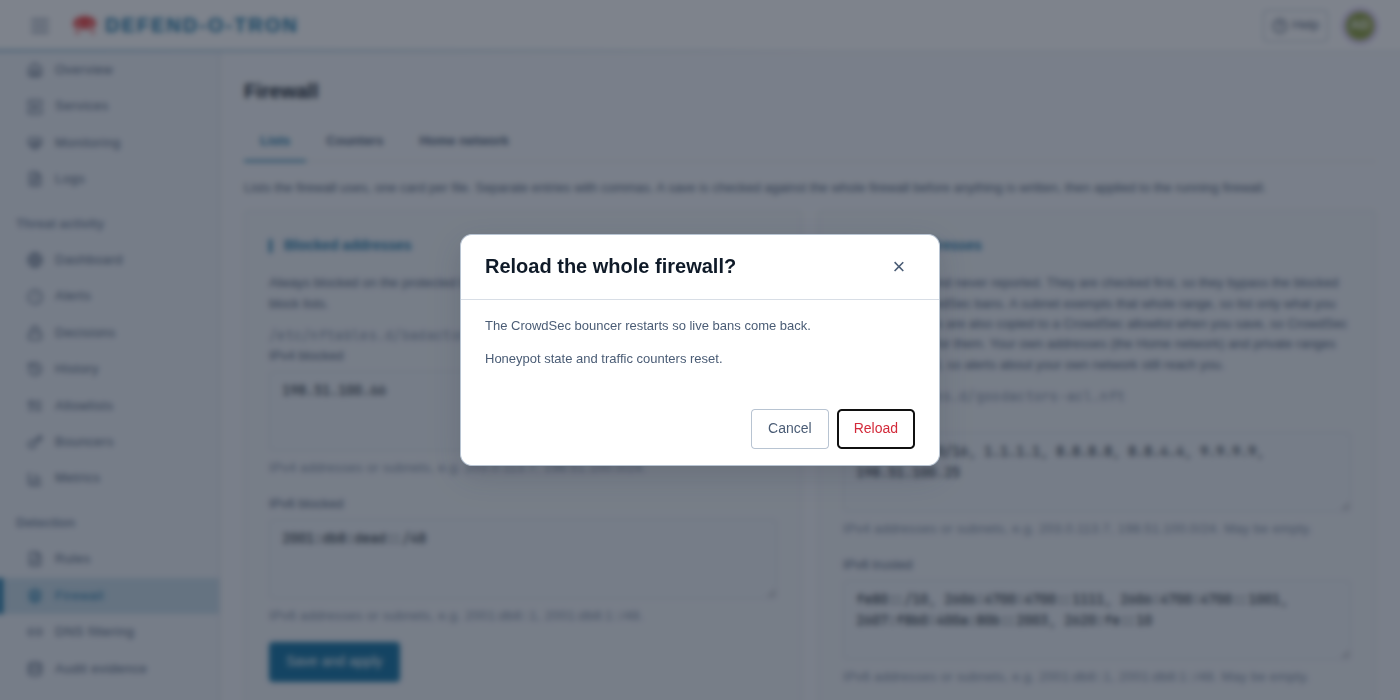
See Reload the firewall for what the page says when it is done.
A hand edit to goodactors-acl.nft reaches CrowdSec’s allowlist the next time the trusted list is saved on the Firewall page.
If you reload the ruleset from the terminal instead (
sudo nft -f /etc/nftables.conf), the live CrowdSec ban lists are emptied and are not refilled by themselves: the bouncer that feeds them only sends changes, not the full list. Restart it straight away withsudo systemctl restart crowdsec-firewall-bouncer, and check it withsudo systemctl is-active crowdsec-firewall-bouncer. Until then the device enforces no CrowdSec bans.
Check the port lists against your firewall’s port forwarding (DNAT) rules. Any port you forward is a port something behind the bridge answers on, and the honeypot assumes these ports are unused: it cannot tell a customer from a scanner. Forward a port that is still in the list, and the first packet from every legitimate user bans that user from every service on your network. Remove the port before you deploy, and check again whenever you add a forward. For SMTP, use TLS on port 465 (SMTPS) or 587 (submission): neither is in the honeypot list.
~$ sudo nano /etc/nftables.d/honeypot-acl.nft
# Scanned ports used in honeypot blocking
# TCP Most Common Ports
define tcp-scanports={ 20-21, 22, 23, 25, 445, 1433-1434, 3128, 3306, 3389, 5985-5986, 8291 }
#
# UDP Most Common Ports
define udp-scanports={ 69, 135-139, 161 }
~$ sudo nano /etc/nftables.d/goodactors-acl.nft
# IPv4
# Most Common Routers, then public DNS resolvers
define goodacl4 = { 192.168.0.0/16, 1.1.1.1, 8.8.8.8, 8.8.4.4, 9.9.9.9 }
#IPv6
# Link Local addresses, then public DNS resolvers
define goodacl6 = { fe80::/10, 2606:4700:4700::1111, 2606:4700:4700::1001, 2607:f8b0:400a:80b::2003, 2620:fe::10 }
Prefixes are allowed. Be deliberate about them: every entry is exempt from enforcement while it is listed, so a prefix exempts that whole range. Keep the list to what you actually trust.
~$ sudo nano /etc/nftables.d/badactors-acl.nft
define badacl4 = { 10.10.10.10 }
define badacl6 = { f000::/64 }
The shipped entries are placeholders. Replace them with the addresses you want to block.
The honeypot rules are not meant to be edited. They ship with the base package and are replaced when it updates. They are shown here so you can see where your lists are checked.
The honeypot is a chain inside the main protection table, one table for IPv4 (crowdsec-ip4) and one for IPv6 (crowdsec-ip6). It is reached only after the trusted, blocked and banned checks, so a trusted host never reaches it.
table inet crowdsec-ip4 {
        chain check-wan4 {
                ip saddr @good-actors4 jump pass-src
                ip saddr @bad-actors4 jump drop-in-actor
                ip saddr @crowdsec-blacklists4 jump drop-in4
                jump honeypot-ip4
        }

        chain honeypot-ip4 {
                tcp dport @tcp-scan-ports update @honeypot-rate4-tcp { ip saddr limit rate 12/minute } counter log prefix "TCP4 honeypot:" group 2
                udp dport @udp-scan-ports update @honeypot-rate4-udp { ip saddr limit rate 12/minute } counter log prefix "UDP4 honeypot:" group 2
        }
}
Two details worth knowing when you read the logs:
- The rate limit is per source address, 12 log lines a minute. A host hammering one port produces evidence at that rate, not once per packet, so the log is a sample of a scan, not a full packet record.
- The honeypot only reports. It blocks nothing itself. It writes evidence that CrowdSec reads, and CrowdSec decides to ban. That is why a ban has an expiry and shows up on the Threat activity pages.
Older firmware ran the honeypot as a separate
table inet honeypot, with its own exempt listsbanexempt4andbanexempt6. A separate table could not read the trusted list, so a trusted host could log evidence against itself and get banned. If you follow older notes that mention them, they describe firmware that no longer ships.
¶ Editing the CrowdSec Parser and Scenario
The CrowdSec parser turns the honeypot’s log lines into structured events. The scenario decides when an address has crossed the line and should be banned.
Only attempt this if you know regular expressions, GROK, and CrowdSec parsers and scenarios well. Back up the original files and test your changes first. CrowdSec has a test tool for parsers and scenarios: see cscli explain.
The two files:
/opt/deploy/crowdsec/config/parsers/honeypot-ban.yaml/opt/deploy/crowdsec/config/scenarios/honeypot-bf.yaml
Updates replace these files. They ship with the services package, and a package or firmware update puts the shipped versions back, without your changes. Keep a copy of your changed files, and apply them again after each update.
After you change either file, restart the CrowdSec container:
sudo do-stacks recreate crowdsec
This stops CrowdSec and starts it again with the changed files. Its stored data is kept.
~$ sudo nano /opt/deploy/crowdsec/config/parsers/honeypot-ban.yaml
# author: Awesome-O Gadgets
name: awesomeo/honeypot-banlog
description: "Parses inbound ban logs from the honeypot mangle rules"
format: 2.0
debug: false
filter: "evt.Parsed.message contains 'honeypot'"
onsuccess: next_stage
pattern_syntax:
  TSTAMP: '%{TIMESTAMP_ISO8601:timestamp}'
  HOSTNAME: '%{WORD:log_host}'
  HONEY_MAC: 'MAC=%{MAC:srcmac}:%{DATA}:%{MAC:dstmac}:%{DATA}'
  HONEY_BAN_BASE_LOG: '%{WORD:ban_type} honeypot: IN=%{WORD:iface} OUT=?(%{DATA:iface_out}) %{HONEY_MAC} SRC=%{IP:src_ip} DST=%{IP:dst_ip} LEN=%{DATA:len} %{GREEDYDATA} PROTO=%{WORD:proto} SPT=%{INT:src_port} DPT=%{INT:dst_port} %{DATA} %{WORD:state}'
nodes:
  - grok:
      apply_on: message
      pattern: '%{HONEY_BAN_BASE_LOG} URGP'
      statics:
        - meta: log_type
          value: honeypot
  - grok:
      apply_on: message
      pattern: ': %{HONEY_BAN_BASE_LOG} SEQ=%{INT:seq}'
      statics:
        - meta: log_type
          value: honeypot

statics:
  - meta: service
    value: honeypot_banlog
  - meta: state_type
    expression: evt.Parsed.state
  - meta: log_host
    expression: evt.Meta.machine
  - meta: ban_type
    expression: evt.Parsed.ban_type
  - meta: ban_protocol
    expression: evt.Parsed.proto
  - meta: ban_port
    expression: evt.Parsed.dst_port
  - meta: source_ip
    expression: evt.Parsed.src_ip
  - meta: interface
    expression: evt.Parsed.iface
  - target: evt.StrTime
    expression: evt.Parsed.timestamp
~$ sudo nano /opt/deploy/crowdsec/config/scenarios/honeypot-bf.yaml
# author: Awesome-O Gadgets
type: trigger
name: awesomeo/honeypot-bf
description: "Detect bruteforce connection attempts from honeypot mangle rules"
version: '1.0'
format: 2.0
debug: false
filter: |
    (evt.Meta.log_type == 'honeypot' and evt.Meta.service == 'honeypot_banlog')
distinct: evt.Meta.ban_type
groupby: "evt.Meta.source_ip + '-' + Lower(evt.Meta.ban_protocol + '-' + evt.Meta.ban_type)"
blackhole: 1m
labels:
  behavior: "generic:bruteforce"
  label: "Honeypot bruteforce scan"
  confidence: 3
  spoofable: 0
  classification:
    - attack.T1595
    - attack.T1110
  service: honeypot-bf
  type: bruteforce
  remediation: true
¶ Honeypot context data
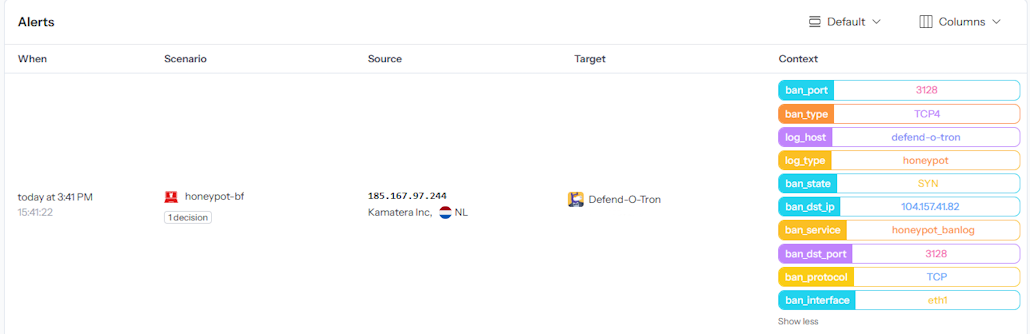
On the CrowdSec console, an alert from the honeypot carries the details the parser adds, shown in the column on the right.
¶ Regex and GROK Reference
¶ Regular expressions (regex)
Regular expressions (regex) are a powerful way to search and change text: a single line of regex can replace dozens of lines of code. They take time to master, and a careless one can match far more, or far less, than you meant.
¶ GROK
GROK is a regex dialect with reusable, named patterns. It works well with logs written for people rather than computers, such as syslog, web server and database logs. CrowdSec uses GROK throughout its parsers, including the honeypot parser above.
¶ Related Pages
- Honeypot: what the honeypot does, and how to handle false positives.
- Log Ingress: the syslog setup that feeds CrowdSec.
- CrowdSec API: connect other systems to the same decisions the honeypot produces.