¶ Metrics
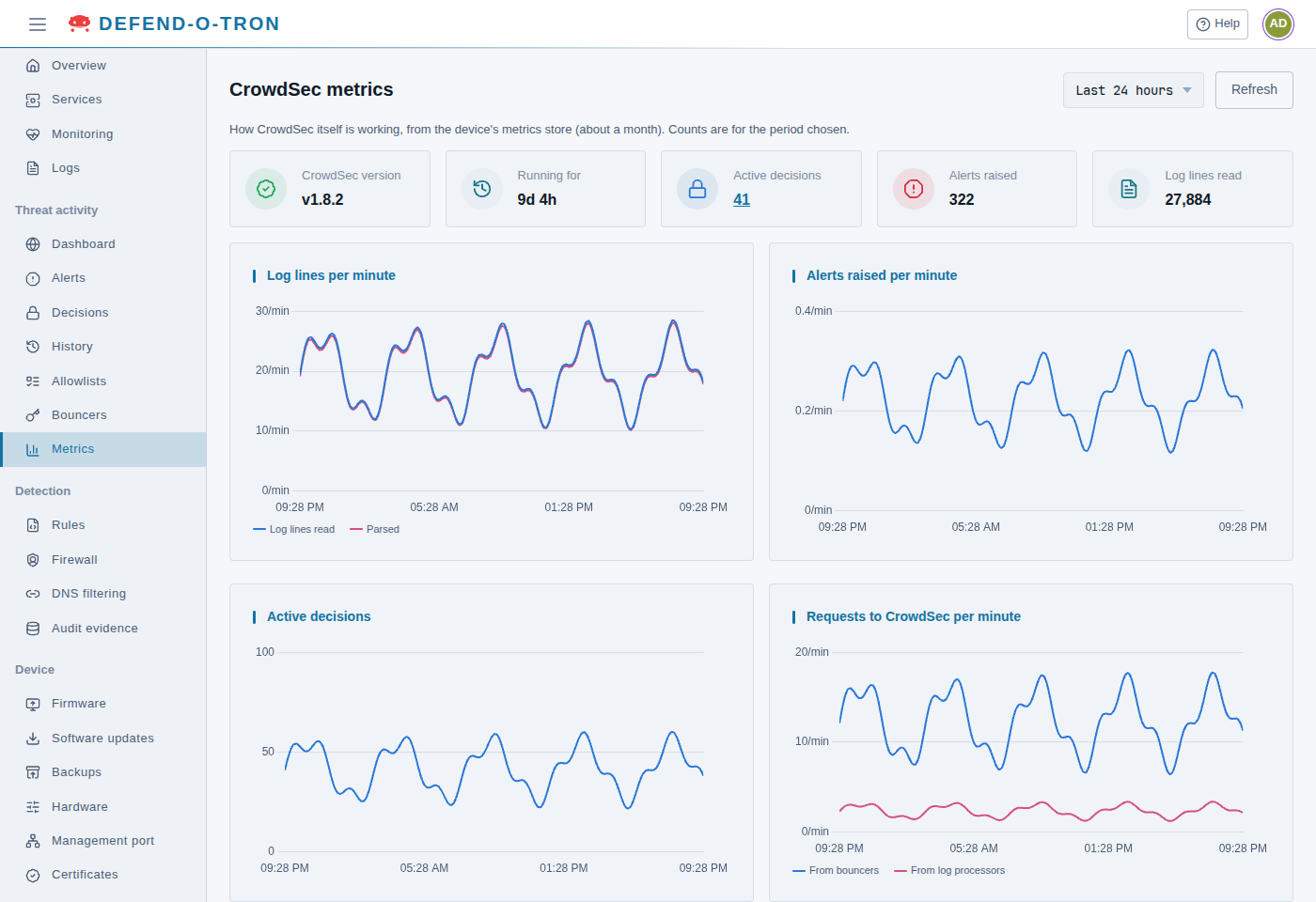
Threat activity → Metrics shows how CrowdSec itself is working: what it reads, what it detects, and who uses its decisions. Use it to check that the protection is healthy, for example that a log you forward is understood, or that every bouncer is still asking for decisions.
The figures come from the device’s metrics store, which keeps them for 90 days on a V100 and 180 days on a V200. Choose the period at the top right, from the Last hour to the Last 30 days (24 hours by default), or Custom… for any period from 10 minutes to 31 days. The counts are for that period. The page reloads its figures at the Auto refresh interval in the user menu (every minute unless you change it). Click Refresh to read them at once.
¶ Totals
- CrowdSec version and Running for: the CrowdSec engine on the device, and how long since it last started.
- Active decisions: the bans in force now. Select it to open Decisions.
- Alerts raised and Log lines read: in the period.
¶ Charts
- Log lines per minute: the lines CrowdSec read, and how many of them it understood (Parsed). The two lines should run close together.
- Alerts raised per minute: how often a scenario raised an alert.
- Active decisions: the bans in force over time.
- Requests to CrowdSec per minute: requests to CrowdSec’s local API, from bouncers and from log processors.
¶ Bouncers
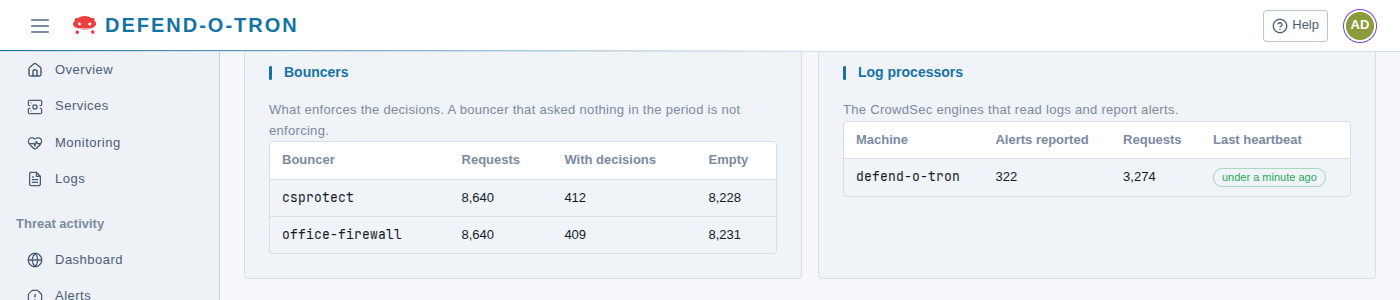
The systems that enforce the decisions: the device’s own firewall bouncer (csprotect), and any system you connected on Bouncers. For each, how many times it asked for decisions (Requests), how many answers carried decisions (With decisions) and how many were Empty (nothing new).
A bouncer that asked nothing in the period is not enforcing anything. Check that it is running and can reach the device.
¶ Log processors
The CrowdSec engines that read logs and report alerts. On a Defend-O-Tron that is the device itself. For each: the Alerts reported, its Requests, and its Last heartbeat. A heartbeat is due every minute, so the page marks one that is more than two minutes old.
¶ Log sources
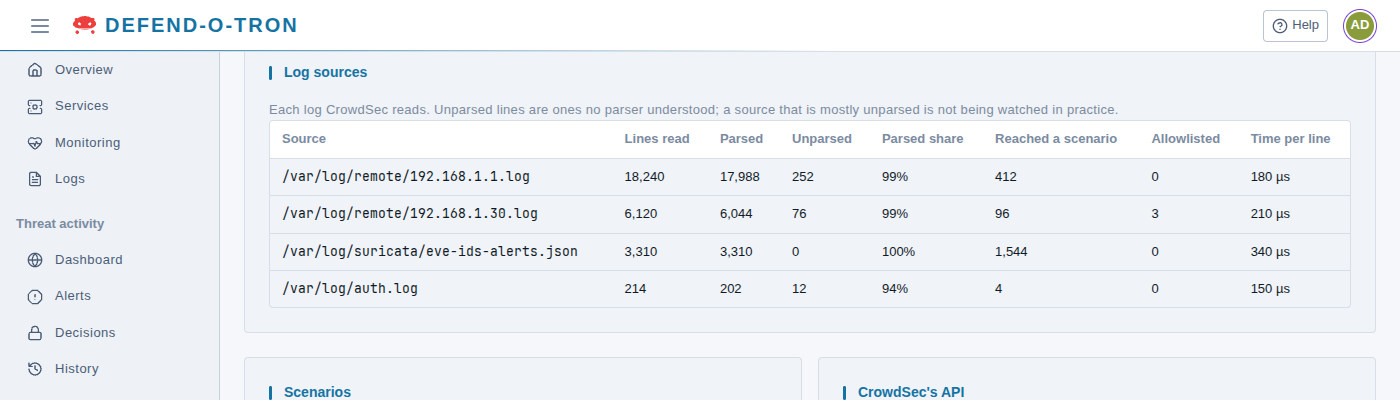
Each log CrowdSec reads, with the lines it read, how many it understood (Parsed) and did not (Unparsed), the Parsed share, how many lines Reached a scenario, how many were Allowlisted, and the average Time per line.
A source that is mostly unparsed is not watched in practice: CrowdSec has no parser for it. See Log Ingress for the logs the device understands, and how to add parsers.
¶ Scenarios
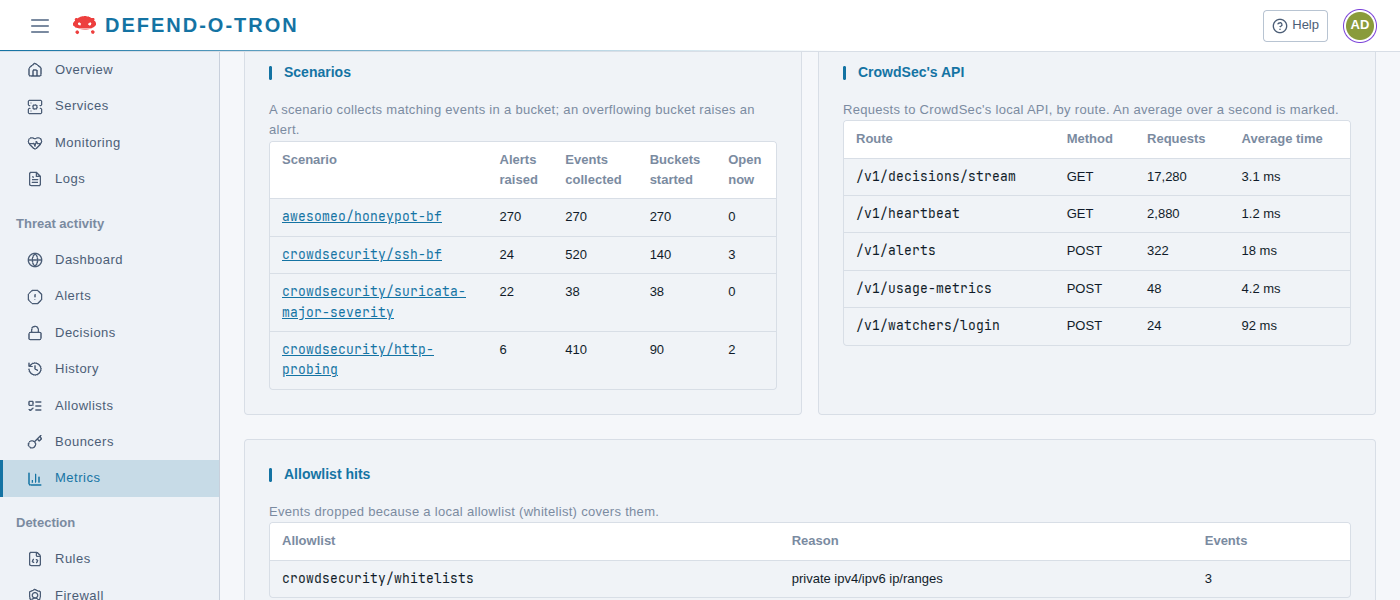
A scenario collects matching events in a bucket. When a bucket overflows (enough events in a short time), the scenario raises an alert. For each scenario: Alerts raised, Events collected, Buckets started, and the buckets Open now. Select a scenario to see its alerts from the last 7 days.
- A trigger scenario raises an alert on its first event, so its alerts equal its events. The honeypot (
awesomeo/honeypot-bf) is one. - A scenario with many events and few alerts, such as
crowdsecurity/ssh-bf, is counting failed attempts up to its limit.
¶ CrowdSec’s API
Requests to CrowdSec’s local API, by Route and Method, with the Average time of each. The busiest route is usually /v1/decisions/stream, which the bouncers ask for new decisions. An average time over a second is marked: the API is slow, which delays bans reaching the bouncers.
¶ Allowlist hits
Events CrowdSec dropped because a local allowlist (CrowdSec calls it a whitelist) covers them, with the allowlist, its reason and the number of events. CrowdSec’s standard crowdsecurity/whitelists drops events from private addresses (such as 192.168.x.x), so a device on your own network is never banned.
¶ Related
- Bouncers: connect other systems to the device’s decisions.
- Log Ingress: send logs to the device, and the parsers it has.
- Allowlists: CrowdSec’s central allowlists.
- Threat Activity: the other Threat activity pages.