The Defend-O-Tron is designed to drop into a wide range of environments. The scenarios below are the ones we see most often. Pick the one that best matches your setup — if more than one applies, the device works across them simultaneously.
Each scenario below has three parts: a self-identification checklist (does this describe you?), the typical deployment shape, and the concrete value the Defend-O-Tron adds.
¶ Single Office
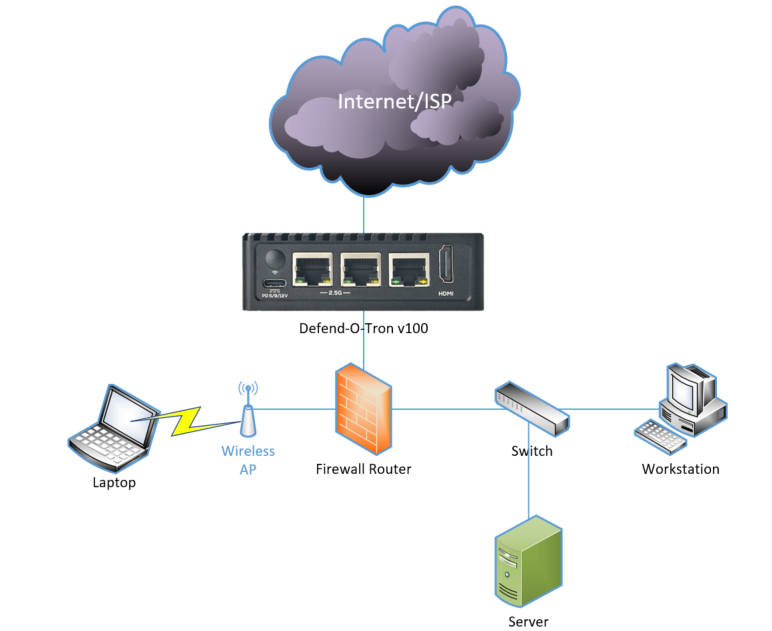
A single business location with on-premises servers (file, mail, web, line-of-business app) and one or more public services exposed via the ISP connection. Most small and medium businesses fit here.
¶ Does this describe you?
- You operate from one physical address.
- You have at least one server reachable from the internet (or your router exposes services like RDP / VPN / mail).
- You’re seeing brute-force login attempts in your server logs.
- An auditor or insurance underwriter has asked about your “cybersecurity posture” in the last 24 months.
If two or more of these tick, this is your scenario.
¶ Typical deployment
- One Defend-O-Tron between the ISP modem and your firewall/router.
- Internal servers continue to operate normally — the device is transparent to outbound and inbound legitimate traffic.
- Optional: forward your web server, mail server, or VPN logs to the device so CrowdSec can parse them and add bad actors to the global blocklist.
¶ What the Defend-O-Tron adds
- Catches port-scanning, brute-force, and ransomware-reconnaissance probes before they reach your firewall.
- Generates the tamper-evident audit evidence your auditor and insurer want to see — see Compliance Reporting.
- One device covers everything; no per-server agents.
¶ Branch Office
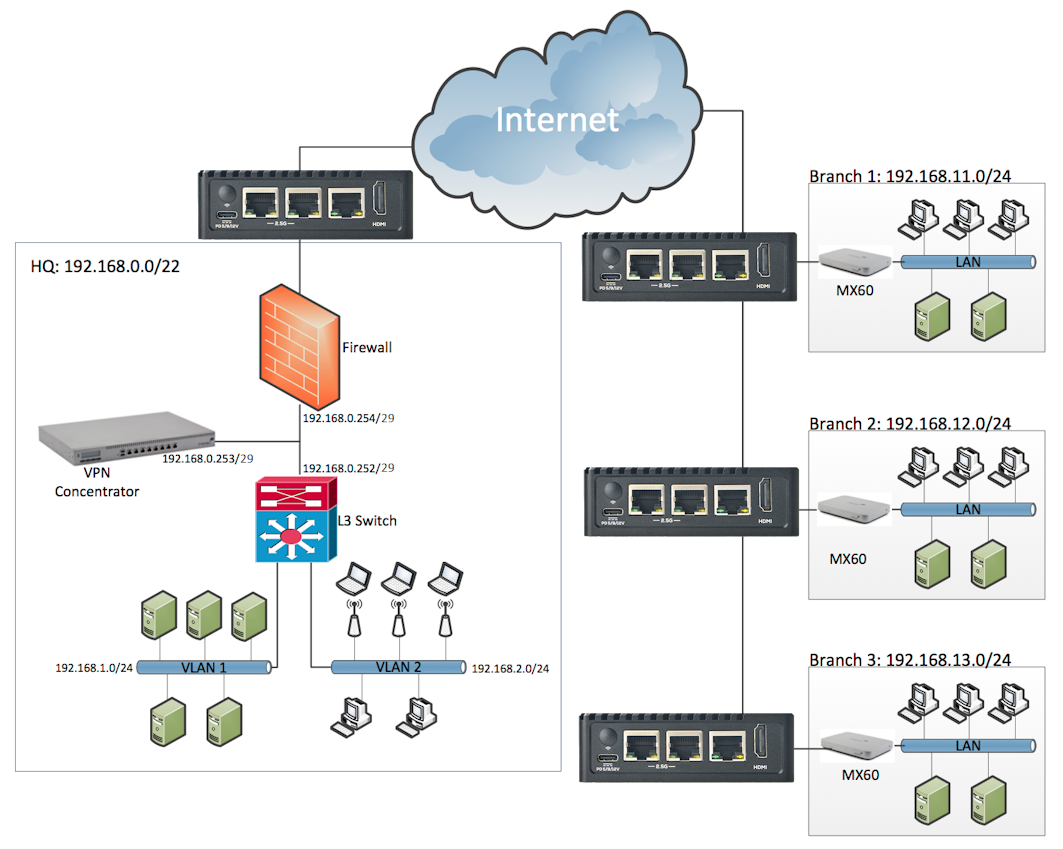
A central headquarters plus one or more branch offices, typically connected by VPN. Common in retail chains, multi-site healthcare, regional legal/accounting practices, and franchise operations.
¶ Does this describe you?
- You have a headquarters plus two or more branch locations.
- Branches connect back to HQ via VPN or SD-WAN (Meraki, Velocloud, Fortinet, etc.).
- Each branch has its own internet connection (not backhauled through HQ).
- You’d like the threat picture from one branch to inform every other branch instantly.
¶ Typical deployment
- One Defend-O-Tron per branch (and one at HQ), each sitting between the branch ISP equipment and the branch firewall/router.
- The branch’s existing SD-WAN appliance stays in place; the Defend-O-Tron is fully transparent to its operation.
- Centralized visibility via the CrowdSec Cloud Dashboard (free community account) or via the remote-bouncer API streaming decisions to your central SIEM.
¶ What the Defend-O-Tron adds
- When branch 1 catches an attacker, branches 2-N see the IP added to their blocklist within minutes — across the global CrowdSec community and your own fleet.
- Each branch’s audit evidence is independently signed and exportable, simplifying multi-site compliance reporting.
- Standalone-per-site failure mode: a branch’s Defend-O-Tron going down doesn’t affect the others.
¶ Industrial Control Systems (PLC & SCADA)
Manufacturing plants, water and wastewater treatment, energy distribution, building automation — any site where programmable logic controllers (PLCs), HMIs, or SCADA systems sit behind an internet connection. Unlike the other scenarios on this page, this one comes with a government advisory attached.
In April 2026, the FBI, CISA, NSA, EPA, DOE and U.S. Cyber Command jointly disclosed ongoing exploitation of internet-facing Rockwell Automation / Allen-Bradley PLCs by state-affiliated attackers, across government facilities, water utilities and energy operators. It followed the 2023 campaign in which at least 75 Unitronics PLCs were compromised — 34 of them at U.S. water utilities — by attackers who simply connected to controllers left on the internet with the factory default password.
The exposure is not marginal. Internet scanning firm Censys counts over 5,200 hosts worldwide answering on EtherNet/IP, nearly three-quarters of them in the United States. Over the same period Dragos tracked 119 ransomware groups hitting 3,300 industrial organizations in 2025 — a 49% jump in a single year, with manufacturing accounting for more than two-thirds of victims.
¶ Does this describe you?
- You operate PLCs, HMIs, or a SCADA system at one or more sites.
- Some part of your control network is reachable from the internet — for remote support, vendor access, telemetry, or historian replication.
- Patching a controller means scheduling a plant shutdown, so it happens rarely.
- You can’t install security software on your PLCs, because no such thing exists for them.
- You’re in scope for NIS2, IEC 62443, or a customer’s supply-chain security requirements.
If two or more tick, this is your scenario.
¶ Typical deployment
At the plant internet edge — the recommended starting point
- One Defend-O-Tron between the ISP equipment and the plant firewall, the same position as the Single Office scenario.
- Everything behind it is covered: remote-access paths, vendor VPN endpoints, and any control equipment that turns out to be more exposed than the network drawing suggests.
- Blocking enabled. The edge is where automated blocking belongs.
At an internal segment boundary — secondary
- One Defend-O-Tron on the link between the business network and the control network, or on a cell uplink — the “conduit” in IEC 62443 terms.
- Because the device is a transparent bridge, this needs no re-addressing and no changes to your control network. It doesn’t become a gateway; nothing needs a new IP address or route.
- Run this placement in detection-only mode, with your known HMIs, engineering workstations and historians in the good-actors list. See Honeypot for the ACL files.
¶ What the Defend-O-Tron adds
- Catches the reconnaissance that precedes these attacks — the internet-wide scanning for EtherNet/IP (44818), Modbus (502), S7comm (102) and the other control protocols attackers sweep for.
- Requires nothing installed on any controller. There is no security agent for a PLC, and this device doesn’t need one.
- Covers the patch gap. When a controller vulnerability can’t be fixed until the next shutdown, blocking at the boundary is what stands in the way meanwhile.
- Inserts without re-addressing — the objection that stalls most network segmentation projects.
- Produces the signed evidence NIS2 (manufacturing, water and energy are all in scope) and IEC 62443 audits ask for. See Compliance Reporting.
- Comes out in seconds. If it ever interferes, pull the cable and the link is exactly as it was.
¶ What this doesn’t replace
Worth being straight about the boundaries:
- It is not a substitute for taking controllers off the public internet. CISA’s first recommendation in every one of these advisories is to disconnect PLCs from the internet and change default passwords. Do that first — this device defends what remains.
- It is not a deep ICS protocol analyser. It detects reconnaissance, known exploit signatures, and IT-borne threats crossing into the control network. Purpose-built OT monitoring platforms model your physical process and alert on abnormal control values; that’s a different product at a very different price.
- It doesn’t belong on deterministic links. Don’t place it on PROFINET IRT, EtherCAT, or motion-control segments where cycle times are measured in microseconds. Supervisory traffic and cell uplinks are where it fits.
- It is an inline device. Put it on a UPS, and treat an internal placement the way you’d treat any other in-line component on that link.
¶ IoT Remote Sensing
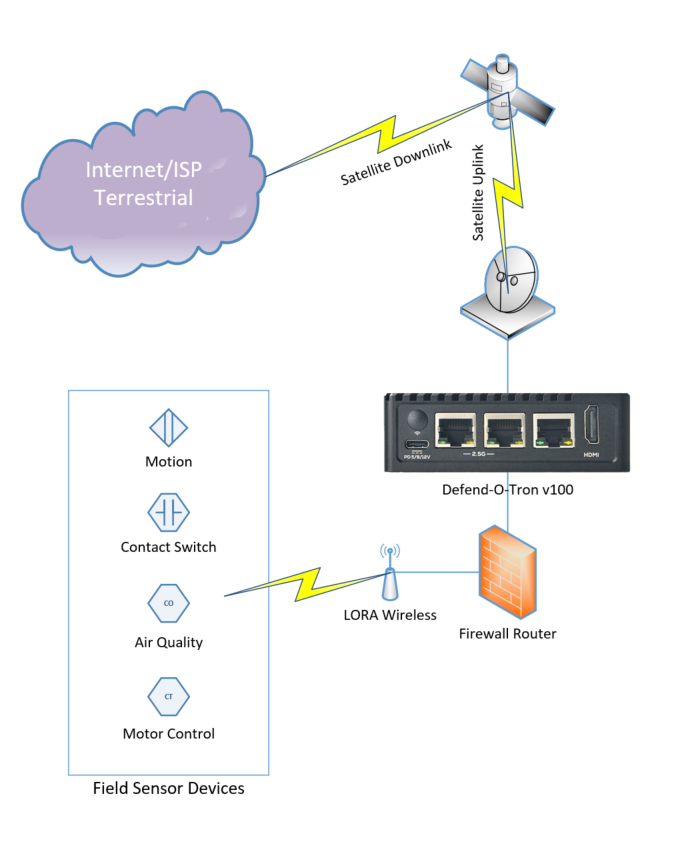
Edge IoT deployments — environmental sensors, industrial equipment, telemetry uplinks, distributed monitoring. Often in locations with limited power, intermittent connectivity, and no on-site IT staff.
¶ Does this describe you?
- You operate edge devices in remote locations (cellular, satellite, fixed-wireless backhaul).
- Power, space, or cooling are constrained.
- On-site management isn’t practical; serial console or remote management is your access path.
- You’re concerned about reconnaissance against IoT-specific protocols (TFTP, NetBIOS, SNMP).
¶ Typical deployment
- Defend-O-Tron at the central IoT uplink location, sized for the device’s modest 10-15W power draw.
- Serial console access (UART0) for management when network connectivity is unavailable. Tools like Minicom on Linux or PuTTY on Windows.
- Optional: feed your IoT gateway’s syslog into the device so CrowdSec can correlate against the global threat picture.
¶ What the Defend-O-Tron adds
- Catches IoT-specific reconnaissance (TFTP, NetBIOS, SNMP probes — see the Honeypot page) before it turns into compromise.
- Aligns with MITRE's EMB3D embedded threat model for edge devices.
- Operates standalone with no cloud dependencies for core protection — community threat intel still arrives but isn’t required for defense.
¶ Home Office / Solo Practitioner
A freelancer, sole proprietor, or single-practitioner business (lawyer, accountant, healthcare provider, consultant, contractor) working from a home or small home-office setup. Often handles client-confidential data with no dedicated IT staff.
¶ Does this describe you?
- You work primarily from home or a small home office.
- You handle client-confidential material (patient records, legal files, financial records, trade secrets).
- You have no dedicated IT staff — you’re the IT department.
- You’d like reasonable assurance against ransomware and credential theft without becoming a security expert.
¶ Typical deployment
- One Defend-O-Tron between your ISP modem and your home router (the simplest deployment).
- No client software, no agents on individual devices — every device on your network is protected transparently.
- Optionally enable the AdGuard DNS filter to block phishing domains at the DNS layer.
¶ What the Defend-O-Tron adds
- Protection without complexity: install, cable in, walk away.
- Tamper-evident audit evidence — useful when answering compliance questions for clients in regulated sectors (healthcare, legal, financial advisory) or for cyber-insurance applications.
- A single point of recovery: if anything ever feels wrong, unplug and you’re back to your original setup in seconds.
¶ Managed Service Provider (MSP)
An MSP, MSSP, or IT consultancy supporting many small business clients. Each client site is typically a single-office scenario; the MSP’s job is to deploy, monitor, and report across the whole fleet.
¶ Does this describe you?
- You support more than five small business clients.
- Each client has their own internet connection and on-site equipment.
- You’re under pressure to deliver “cybersecurity” as part of your service offering without standing up a full SOC.
- You’d value centralized visibility into threats hitting your clients’ networks.
¶ Typical deployment
- One Defend-O-Tron per client site, in the same position as the Single Office scenario.
- Centralized monitoring via the CrowdSec Cloud Dashboard, or by attaching each device’s decision stream to your own SIEM via the CrowdSec API.
- Standardized initial configuration across all clients — the same admin password rotation policy, the same Root CA distribution, the same audit-retention policy.
- Use your existing remote-access infrastructure (VPN, jumphost, RMM) to reach each Defend-O-Tron’s admin interface; the device’s built-in Remote Support tunnel is the customer-initiated channel to Awesome-O’s support team, not an MSP-controlled remote-management path.
¶ What the Defend-O-Tron adds
- Each client gets enterprise-grade defense at a price point that fits SMB budgets — you build margin into the service offering instead of buying a SIEM seat per client.
- Per-client tamper-evident audit evidence (NIS2, SOC 2, ISO 27001) ready to hand to each client’s auditor with one command. Easy compliance deliverable.
- One threat intelligence source informs every client’s enforcement — when one client gets probed by a new actor, every other client’s device blocks them automatically.
- Single learning curve: master the admin interface once, use the same workflow across every site.
¶ Not Sure Which Fits?
The Defend-O-Tron works across scenarios — many real-world deployments span two or three of the above (a small business with a home-office owner who also operates a remote IoT pilot, for example). When in doubt, start with the Single Office scenario and expand from there as your environment grows.
For a full feature list, see System Features. For deployment prerequisites before you order or install, see Requirements.