¶ Root Certificates
The Defend-O-Tron comes with its own internal certificate authority. Installing the public Root CA on your management workstation removes the browser "not secure" warnings when you visit the admin interface, and is required for several other features to work cleanly.
¶ Why install the Root CA
- Cleaner browsing experience. No more clicking through "your connection is not private" warnings every time you open the admin interface, AdGuard DNS console, or Grafana dashboards.
- Remote bouncer support. When you attach an external firewall, web server, or reverse proxy to the device's CrowdSec API, the bouncer software validates the device's TLS certificate against the trust store on its host. Without the Root CA installed there, the bouncer refuses to connect.
- Fully secure syslog forwarding. External systems that forward syslog to the device over TLS (RFC 5424 over TCP) need the Root CA to validate the connection.
¶ Downloading the Root CA
- Open the Defend-O-Tron admin interface.
- Click Tools → Root CA Download in the Cockpit sidebar.
- Click the Download button — your browser saves the certificate file (typically
defend-o-tron-rootca.crtor similar).
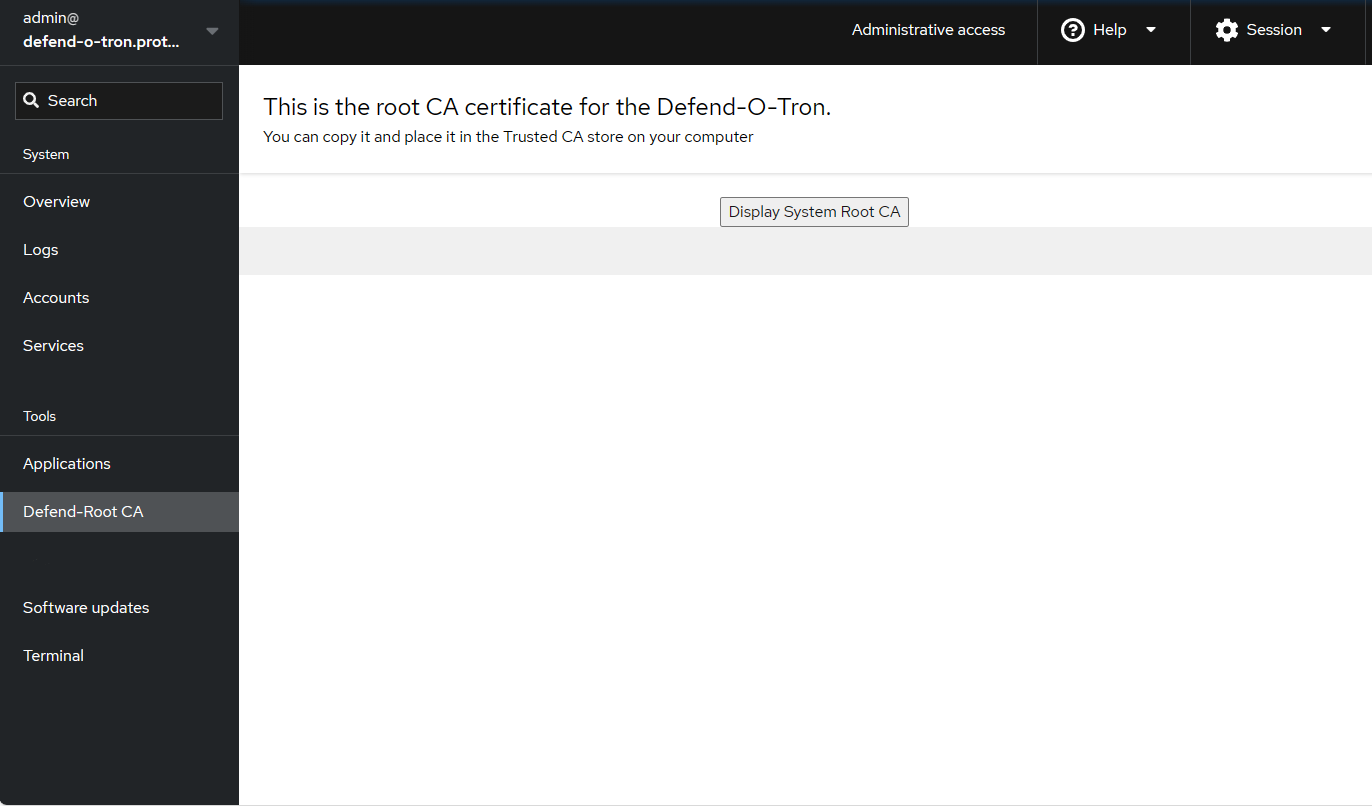
The fingerprint shown on the page is the unique identifier for your specific device's CA. Note it down if you'd like to verify it matches during installation.
¶ Installing the Root CA
Depending on your browser and/or operating system the installation procedure for a certificate can vary, make sure to check the OS or browser documentation.
- Download the certificate and save it locally
- Open the certificate to display it. You should see a dialog similar to below.
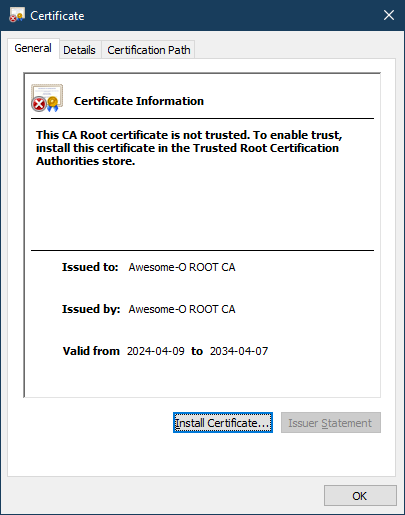
- Click the Install Certificate button
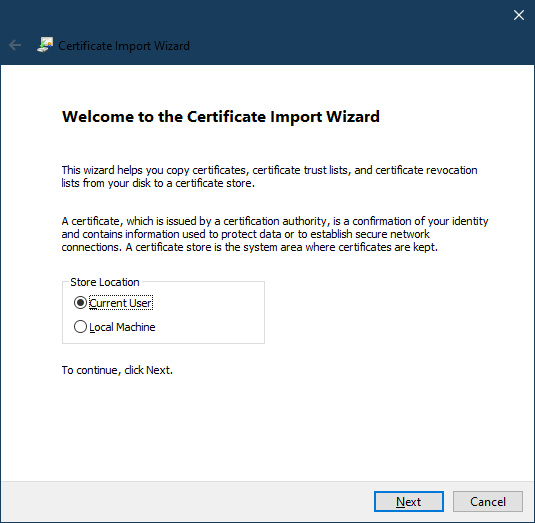
- Click Next
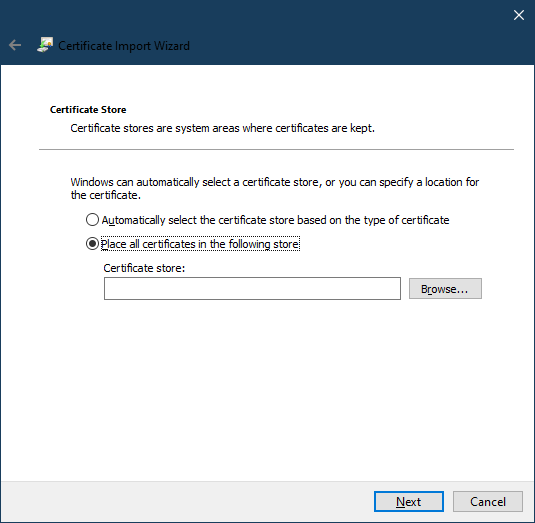
- Select the "Place all certificates" option. Click Browse
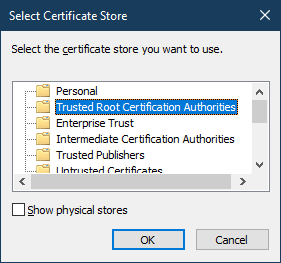
- Select "Trusted Root Certificate Authorities". Click OK
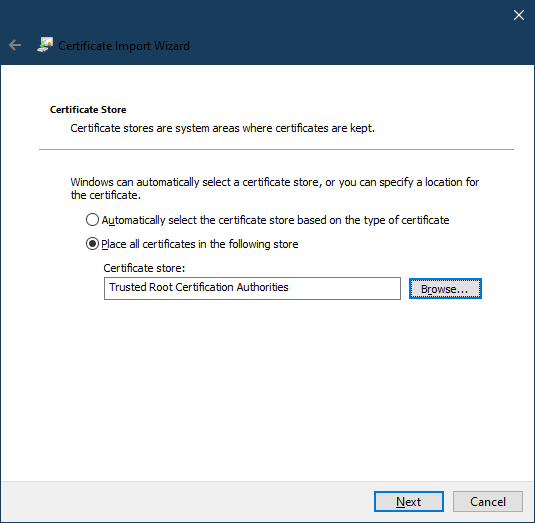
- Click Next, then Finish
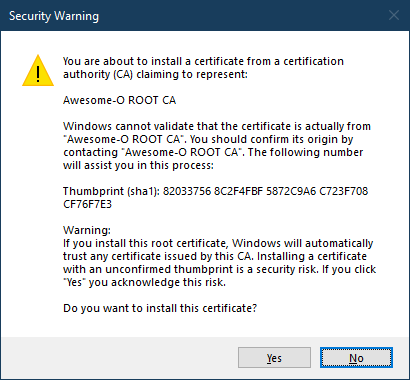
- Confirm the security warning. The thumbprint should match the fingerprint displayed on the Root CA page in the management interface. Click Yes
- Download the Root CA to your Downloads folder.
- Open Keychain Access — Applications → Utilities → Keychain Access, or press ⌘+Space and search.
- Select the System keychain in the sidebar.
- Drag the downloaded
.crtfile onto the System keychain. macOS prompts for an administrator password — enter it. - Find the new Defend-O-Tron Root CA entry (the name comes from your device's CA subject). Double-click it.
- Expand the Trust section.
- Set When using this certificate to Always Trust.
- Close the window. macOS prompts for your administrator password again to save the trust change.
Certificates trusted in the System keychain are honoured by Safari, Edge, Chrome, and most native macOS apps automatically. Firefox uses its own trust store — see the Firefox tab.
The command depends on which family your distribution belongs to.
¶ Debian / Ubuntu / Linux Mint / Raspberry Pi OS
sudo cp defend-o-tron-rootca.crt /usr/local/share/ca-certificates/defend-o-tron.crt
sudo update-ca-certificates
update-ca-certificates reports 1 added on first install. Subsequent re-runs report 0 added because the file is already in place.
¶ RHEL / CentOS / Rocky / AlmaLinux / Fedora
sudo cp defend-o-tron-rootca.crt /etc/pki/ca-trust/source/anchors/
sudo update-ca-trust
¶ Arch / Manjaro / EndeavourOS
sudo trust anchor --store defend-o-tron-rootca.crt
¶ Verifying the install
On any of the above, you can confirm the trust update worked with a quick curl:
curl -I https://defend-o-tron.protected.lan/manage
A clean HTTP/2 200 (or HTTP/1.1 200 OK) response with no certificate warning means the trust is in place. If you still see a TLS error, restart whatever client you're using (browser, application, etc.) to pick up the new trust anchor.
Long-running services (Docker containers, systemd units) typically need a restart to pick up new CAs — they cache the trust store at startup.
Firefox maintains its own certificate trust store, separate from the operating system's. If you use Firefox to manage the Defend-O-Tron you'll need to import the Root CA there as well — even after you've installed it system-wide.
- Open Firefox.
- Open Settings → Privacy & Security.
- Scroll down to Certificates and click View Certificates....
- Select the Authorities tab.
- Click Import....
- Select the downloaded
.crtfile. - Check Trust this CA to identify websites.
- Click OK.
The Defend-O-Tron Root CA appears in the Authorities list under the device's CA name. From now on, Firefox treats the admin interface (and any other site signed by your Defend-O-Tron's CA) as fully trusted.
Firefox 65 and later honour enterprise-deployed certificates from the OS trust store automatically when the
security.enterprise_roots.enabledpreference is on (which is the default on most installs). If you've already installed the CA at the OS level and Firefox still complains, check that preference inabout:config. If it'strueand the OS-level install is correct, no Firefox-side import is needed — but explicit import via the steps above always works.